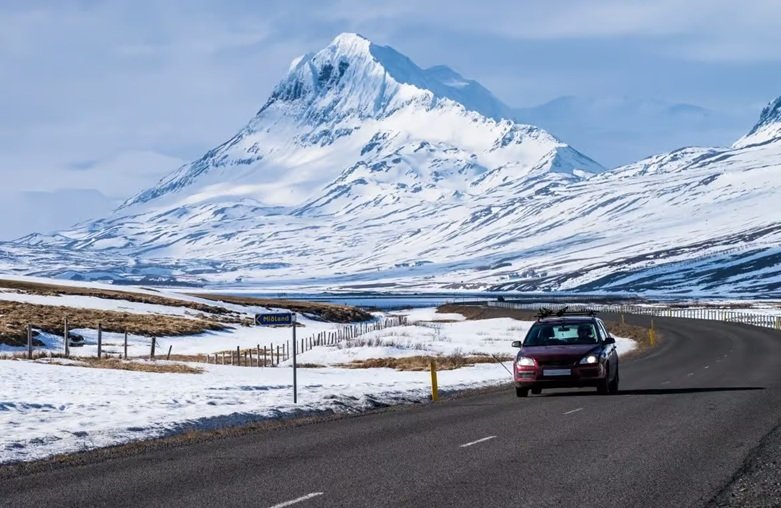

A Northern Lights road trip is one of the most unforgettable ways to experience the Arctic. Instead of following a fixed tour schedule, a self-drive aurora adventure gives you complete freedom—freedom to escape city lights, adjust your route based on weather conditions, and stop whenever the sky begins to glow.
Popular aurora destinations such as Iceland, Norway, Finland, and Sweden offer incredible landscapes, but they also come with challenges: long distances, extreme cold, limited services, and night driving. To travel safely and comfortably, preparation is essential—especially when it comes to navigation, communication, and in-car technology.
In-Car Connectivity Plays a Key Role in Aurora Road Trips
When driving through remote northern regions, reliable in-car connectivity is not a luxury—it’s a necessity. Many aurora viewing spots are far from towns, with minimal lighting and few road signs. This makes hands-free navigation and real-time information extremely important.
Carlinkit is a wireless adapter that upgrades factory car systems by enabling wireless Apple CarPlay or Android Auto, even in vehicles that only support wired connections. Once connected, your smartphone integrates seamlessly with the car’s infotainment screen.
For a Northern Lights road trip, this means you can:
- Use Google Maps or Apple Maps without plugging in your phone
- Access navigation, calls, and messages hands-free
- Receive real-time traffic, road condition, and safety alerts
- Switch routes easily when the weather or visibility changes
Wireless connectivity reduces cable clutter and allows drivers to focus on the road—especially useful during night driving on icy or unfamiliar roads.
Why Carlinkit Is Useful in Remote Northern Regions
Driving in aurora destinations often involves long hours behind the wheel, sometimes in complete darkness. In these situations, stopping frequently to check your phone is inconvenient and unsafe.
Carlinkit helps centralize everything on your car’s screen, allowing you to:
- Check weather forecasts and cloud coverage quickly
- Monitor road conditions without manual phone use
- Stay connected in case of emergencies
- Navigate between remote viewing spots smoothly
Because aurora activity can change suddenly, having instant access to navigation and updates makes it easier to react and move to a better location when conditions improve.
Road and Weather Challenges in Northern Lights Destinations
Northern Lights are best seen at high latitudes, which usually means colder temperatures and more extreme weather. Travelers should expect:
- Snow-covered or icy roads
- Strong winds and sudden weather changes
- Long distances between gas stations and rest areas
- Limited mobile signal in rural regions
In these conditions, having a stable in-car system connected to your phone is critical. Wireless CarPlay via Carlinkit allows you to continuously check weather updates, road alerts, and nearby services without distraction.
Using Aurora Forecast Apps with Wireless CarPlay
Aurora visibility depends on solar activity, cloud cover, and location. Even experienced travelers rely on aurora forecast apps to improve their chances of seeing the lights.
Apps like Aurora Alerts provide:
- Real-time aurora forecasts and KP index updates
- Cloud coverage and weather conditions
- Location-based notifications when aurora activity increases
When accessed through wireless CarPlay, these apps become easier to use during a road trip. You can adjust your route, wait at a specific location, or move to clearer skies without pulling over to check your phone.
Comfort and Entertainment During Long Night Drives
Aurora hunting often means late nights and long waiting periods. Comfort inside the vehicle becomes an important part of the experience.
With Carlinkit and wireless CarPlay, drivers can:
- Play music, podcasts, or audiobooks during long drives
- Listen to live weather or local radio updates
- Stay relaxed and entertained while waiting for aurora activity
These small details help reduce fatigue and make the journey more enjoyable—especially during cold Arctic nights.
Final Thoughts: Smart Technology Enhances the Aurora Experience
A successful Northern Lights self-drive trip is about more than just luck. It’s about preparation, safety, and flexibility. Combining modern in-car technology like Carlinkit with reliable Northern Lights travel resources allows travelers to navigate remote regions with confidence.
Whether you’re driving Iceland’s Ring Road or exploring northern Norway, wireless car connectivity helps you stay informed, adapt to changing conditions, and focus on the magic happening above you.
With the right tools and planning, your aurora road trip can be safer, smoother, and truly unforgettable.
Frequently Asked Questions (FAQ)
Is a self-drive Northern Lights road trip safe?
Yes, a self-drive Northern Lights road trip can be safe if you are well prepared. Most aurora destinations such as Iceland and Norway have well-maintained roads, but winter conditions can be challenging. Drivers should monitor weather forecasts, road conditions, and avoid driving during severe storms. Using hands-free navigation and real-time updates through Apple CarPlay or Android Auto can significantly improve safety during long night drives.
Do I need special navigation tools for chasing the Northern Lights?
Reliable navigation is highly recommended when chasing the Northern Lights. Aurora viewing spots are often located far from cities and main roads. A wireless in-car system like Carlinkit allows drivers to use Google Maps or Apple Maps directly on the car’s screen, making route planning and last-minute changes easier without touching a phone.
What is Carlinkit and how does it help during a road trip?
Carlinkit is a wireless adapter that enables wireless Apple CarPlay or Android Auto in vehicles that normally require a cable. During a Northern Lights road trip, Carlinkit helps drivers access navigation, weather updates, aurora forecast apps, calls, and messages hands-free. This is especially useful when driving at night or in icy conditions where distractions should be minimized.
Can I use aurora forecast apps while driving?
Yes, aurora forecast apps such as Aurora Alerts can be used during a road trip. When connected through wireless CarPlay with Carlinkit, these apps can be accessed from the car’s infotainment screen. This allows travelers to track real-time aurora activity, cloud coverage, and solar conditions, helping them decide when to stop or change locations.
Which countries are best for a Northern Lights road trip?
Some of the best countries for a Northern Lights self-drive trip include:
- Iceland
- Norway
- Finland
- Sweden
These destinations offer good road infrastructure, dark skies, and frequent aurora activity during the winter months. Driving gives travelers the flexibility to move away from clouds and light pollution.
Is wireless CarPlay reliable in cold weather?
Wireless CarPlay generally works well in cold climates as long as your phone and vehicle are functioning normally. Carlinkit does not rely on external cables, which can be convenient in freezing temperatures. Keeping your phone warm and fully charged helps ensure a stable connection during long winter drives.
What should I prepare besides navigation and car technology?
In addition to in-car connectivity, travelers should prepare warm clothing, emergency supplies, extra fuel planning, and offline maps in case of poor signal. Combining good preparation with smart car technology makes a Northern Lights road trip safer and more enjoyable.